Multi-currency support
GiveFlow lets you accept donations in multiple currencies. Donors can give in their preferred currency, and GiveFlow converts all amounts to your base currency for consistent reporting.
Set up supported currencies
- Go to GiveFlow > Settings > Currency.
- Set your base currency. This is the currency used for dashboard totals and reports. Choose it before you go live: once live donations are recorded against it, GiveFlow refuses to change it. Test donations do not lock it.
- Enable the additional currencies you want to accept. Your base currency is always on.
Your base currency is the single source of truth for all aggregate reporting. Every donation amount is converted to your base currency for KPI calculations.
Currency-switcher form block
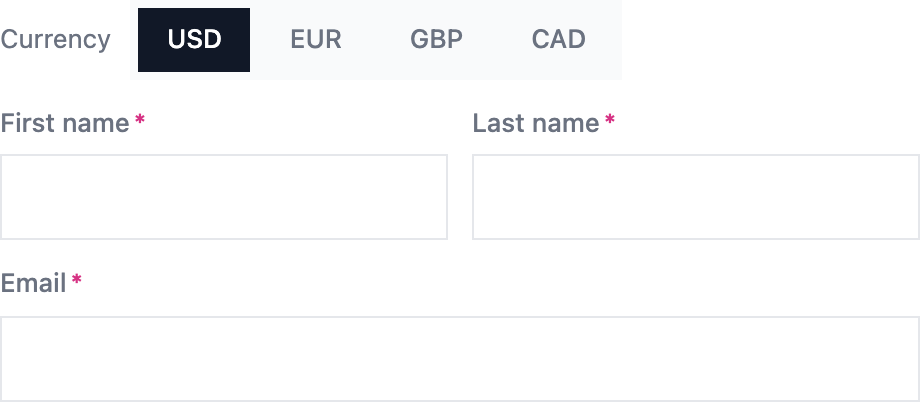
GiveFlow includes a currency-switcher block that you can add to your donation forms. This block lets donors choose their preferred currency directly on the form.
- Open a donation form in the form builder.
- Add the Currency switcher block to your form.
- In the block settings, pick which of your enabled currencies donors can switch between on this form. Your base currency is always included, and a currency you have not enabled under GiveFlow > Settings > Currency cannot be offered.
Pick at least one currency besides your base. With only one currency to offer, the block renders nothing on the published form.
You can show the choice as a dropdown or as pills, and align it left or right, from the same block settings.
When a donor selects a different currency, the form converts and re-rounds the displayed amounts automatically.
How exchange rates work
GiveFlow keeps a snapshot of exchange rates in the giveflow_fx_rates option. By default it refreshes once a day from the European Central Bank reference rates. Under GiveFlow > Settings > Currency you can turn the automatic refresh off, fetch rates on demand, or type your own rate for a currency.
When a donor submits a donation in a non-base currency, GiveFlow uses the rate in force at that moment to calculate the equivalent base currency amount. Both amounts are saved with the donation record, so changing a rate later never alters donations that already exist.
How multi-currency donations are stored
Each donation record stores three currency-related values:
- Local amount — the amount in the currency the donor selected
- Base amount — the equivalent amount in your base currency
- FX rate — the exchange rate used at the time of the donation
This approach preserves the exact amount the donor intended to give while allowing accurate reporting in a single currency.
Reporting in base currency
All dashboard KPIs, campaign totals, and reports aggregate amounts in your base currency. This gives you a consistent view of your fundraising performance regardless of which currencies your donors used.
Individual donation records still show the original local currency amount. The donations list shows the base currency equivalent beneath the donor’s amount whenever the two differ.